


Real-time Monitoring
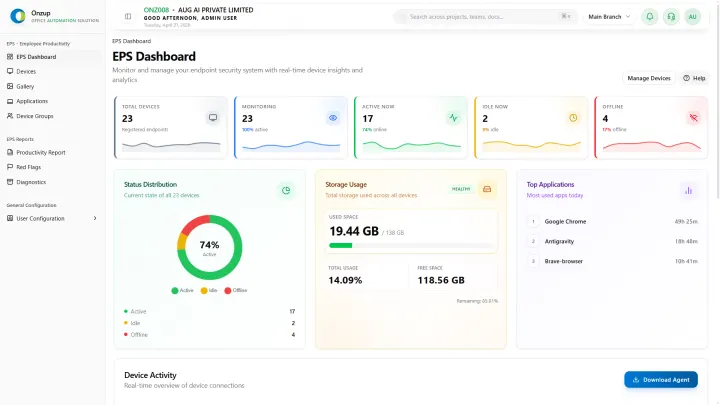
Track live device activity, status, and work sessions.
EPS securely tracks employee activity, productive time, and operational risk across office, remote, and hybrid environments.
Trusted by teams already using EPS
EPS runs quietly in the background to capture activity signals, detect idle time, monitor app usage, and generate proof-ready reports without interrupting employees.
Track live device activity, status, and work sessions.
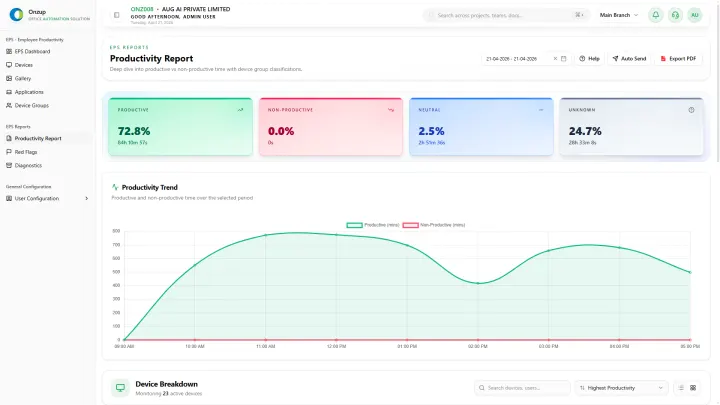
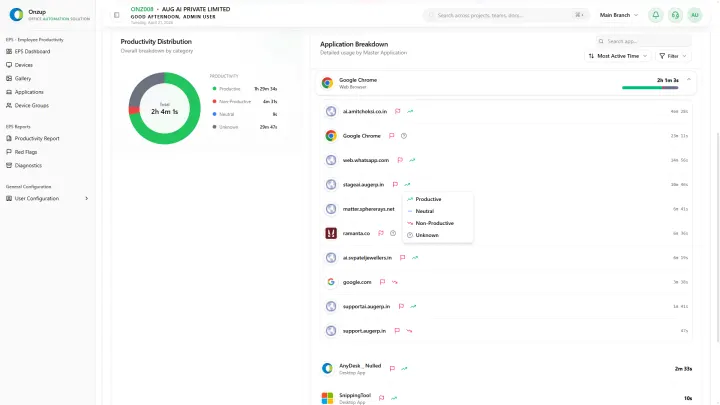
Classify productive, neutral, and non-productive work automatically.
Detect unusual idle patterns, policy violations, and risky behavior.
Capture screenshots and export audit-ready productivity reports.
Secure access controls, encrypted records, and role-based visibility keep productivity data protected.
Six deeply built capabilities that give leadership complete operational visibility from live device status to exportable audit reports.
EPS connects monitoring, scoring, proof, reporting, and governance into one streamlined workflow for modern office, remote, and hybrid teams.
Deploy the lightweight MSI or Linux package across workstations in minutes.
Devices join securely with mapped identities, teams, and policy controls.
Capture app usage, website activity, screenshots, and activity signals continuously.
Leadership reads intensity scoring, proof streams, and exceptions from one dashboard.
Coach, export reports, investigate anomalies, and improve execution with evidence.
Operational health
Executive dashboardActivity drift, idle spikes, and blocked execution surface before escalation.
Score-backed context and screenshots keep coaching clear and fair.
These are the actual screens your team uses every day — screenshot review, activity tracking, productivity reports, and device dashboards. Evidence in context, not pitch decks.
EPS gives your team one place for employee activity visibility, screenshot proof, app and website usage, idle time, alerts, and productivity reports.
These pages cover practical Onzup EPS workflows with targeted context for Indian business teams.
Practical articles on monitoring, productivity, hybrid work visibility, reporting, and operational proof.
Learn what employee audit software should capture for internal reviews, client escalations, HR governance, and compliance-ready reporting.
Compare the capabilities a buyer should expect from an employee monitoring system, including activity tracking, screenshots, reports, privacy controls, and rollout support.
See how activity signals, productivity trends, idle-time data, screenshots, and reports can support fairer employee performance management conversations.


